


Most smartphone security features become visible only after the device is already running. You see lock-screen authentication, app permissions, biometric prompts, and encrypted messaging.
But some of the most important security checks happen much earlier.
Before Android or iOS fully starts, the device needs to answer a basic question: Can the software being loaded actually be trusted?
That is where secure boot comes in.
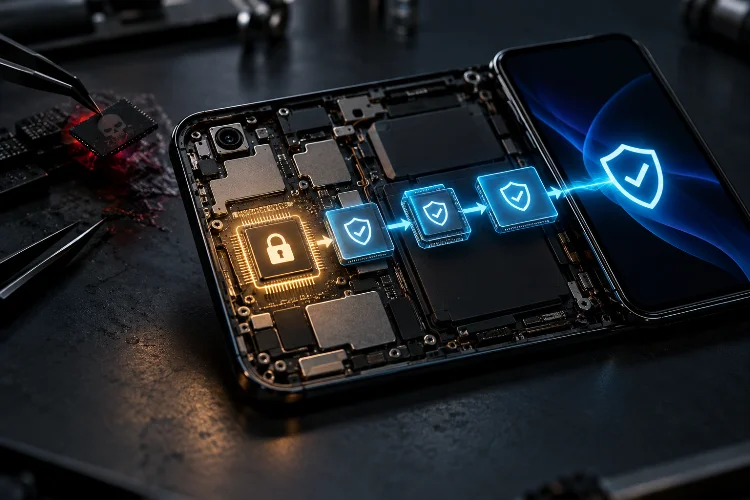
Secure boot creates a cryptographic chain of trust that begins with hardware and continues through bootloaders, operating-system kernels, firmware, and protected system partitions. If one stage has been modified unexpectedly, the next stage should not simply trust it.
This is why secure boot protects smartphones from low-level system attacks so effectively. Malware that operates below ordinary apps can be exceptionally dangerous because it may start before many traditional defenses become active.
By verifying system software before execution, secure boot makes it much harder for attackers to secretly replace critical components, install persistent bootkits, or downgrade a device to vulnerable software.
Secure Boot Starts Before the Operating System
The key advantage of secure boot is timing.
Security checks begin before the normal operating system takes control.
On Apple devices, startup begins with immutable Boot ROM code built into the chip during manufacturing.
Apple describes this as the hardware root of trust. That code contains the information needed to verify that the next bootloader stage is cryptographically signed before allowing it to execute.
Android Verified Boot follows the same broad concept.
Google describes a chain of trust that begins with a hardware-protected root of trust and continues through the bootloader, boot partition, and verified partitions such as system and vendor. Each stage verifies the integrity and authenticity of the next one before handing over execution.
That order matters.
If verification only happened after Android or iOS had already loaded, a compromised boot component could potentially interfere with the security software trying to inspect it.
Secure boot tries to establish trust first.
The Chain of Trust Makes Tampering Harder
Think of secure boot as a relay race where every runner checks the identity of the next runner before passing the baton.
The first stage is trusted because it is anchored in hardware.
That stage verifies the next component using cryptographic signatures or hashes. The verified component then checks the next one, continuing until the operating system reaches a trusted state.
Apple’s secure boot chain covers components such as bootloaders, the kernel, and certain firmware. Its Boot ROM verifies iBoot, and iBoot then verifies the operating-system kernel before transferring control.
Android uses a similar progression through Verified Boot.
The important idea is that trust is not automatically inherited.
A component must prove that it matches what the manufacturer or trusted signer expected.
If malware silently modifies a boot image, the cryptographic verification should no longer match.
That turns low-level tampering into something the device can detect instead of blindly executing.
Verified System Partitions Protect Critical OS Files
Attackers do not always need to replace the first bootloader.
Modifying operating-system partitions can also create powerful persistence.
Android therefore extends verification beyond the initial boot stage.
Verified Boot checks critical partitions, while dm-verity can verify blocks of larger partitions as the system accesses them. If the calculated cryptographic root no longer matches the expected signed value, Android treats the data as corrupted rather than trusting it.
This helps defend against malware that attempts to modify system files and survive a reboot.
Without this protection, an attacker with sufficient privileges might try to patch system binaries, replace security services, or insert malicious code that starts whenever the phone boots.
Verification changes the assumptions.
System partitions are no longer considered trustworthy simply because they exist on internal storage. Their integrity must match a known cryptographic state.
That makes persistent system modification considerably harder.
Secure Boot Makes Bootkits More Difficult to Hide
Bootkits are particularly dangerous because they try to execute before or underneath the main operating system.
That position can give an attacker significant control.
A bootkit might attempt to manipulate the kernel as it loads, disable security protections, hide malware from normal monitoring tools, or reinstall malicious components after the user removes them.
Secure boot directly targets this problem.
If an attacker replaces a trusted bootloader or kernel with a modified version, signature verification should fail before the altered component receives control.
Apple explicitly states that its secure boot chain is designed to verify that the lowest levels of software have not been tampered with.
Android Verified Boot similarly aims to ensure that executed code comes from a trusted source rather than an attacker or corruption.
This does not make boot-level attacks impossible, but it removes one of the easiest forms of persistence: simply replacing trusted startup code with something malicious.
Rollback Protection Blocks an Important Attack Path
Secure boot needs to verify more than authenticity.
It also needs to verify freshness.
Imagine an old version of Android that was legitimately signed by the manufacturer but contains a known kernel vulnerability.
An attacker might try to downgrade the device to that old release, exploit the vulnerability, gain deep system access, and then establish persistence.
The software is technically authentic, but it is no longer secure.
Android addresses this through rollback protection.
Google explains that Verified Boot records version information in tamper-evident storage and can refuse to boot system components older than the permitted version. The goal is to stop attackers from deliberately installing vulnerable older software.
Apple follows the same general principle in its platform security architecture. Its update system is designed to prevent downgrade attacks that attempt to return the device to a known-vulnerable operating-system version.
This is a crucial detail.
A valid signature alone is not enough. Secure startup also needs protection against replaying yesterday’s trusted but exploitable software.
Hardware Root of Trust Prevents Easy Replacement of the Verifier
A security system is only as strong as the component performing the first verification.
If attackers could replace that verifier, they could simply tell it to trust their malicious software.
That is why secure boot usually begins from hardware-backed or immutable code.
Apple’s Boot ROM is fixed when the chip is manufactured and acts as the hardware root of trust for iPhone and iPad startup.
Android’s architecture similarly assumes a hardware-protected root of trust at the beginning of the Verified Boot chain.
This creates a much stronger foundation than storing the first verification logic inside ordinary writable storage.
The attacker cannot simply rewrite the root checker using the same privileges used to modify normal operating-system files.
Hardware-backed trust anchors therefore connect silicon security directly to software integrity.
That integration is what gives secure boot much of its strength.
Secure Enclaves Often Have Their Own Boot Chain
Security-sensitive coprocessors may also perform secure boot independently.
Apple’s Secure Enclave provides a clear example.
It contains its own Secure Enclave Boot ROM, which establishes a dedicated hardware root of trust.
During startup, the Secure Enclave verifies the cryptographic hash and signature of its operating-system image before executing it. If verification fails, the Secure Enclave is designed to refuse normal use until the chip resets.
This creates a second protected boot environment.
The main application processor verifies its own startup path, while the secure subsystem separately verifies the software responsible for highly sensitive operations.
That matters because secure enclaves may handle cryptographic keys, biometric authentication, and other valuable secrets.
If their firmware could be silently replaced, many higher-level security guarantees would weaken.
Secure boot therefore extends beyond the main operating system in well-designed devices.
Secure Boot Also Helps Detect Corruption
Not every verification failure means an attacker is present.
Storage corruption, failed updates, or hardware problems can also modify system data.
Secure boot still helps because the device can detect that what it is about to execute no longer matches the expected trusted state.
Android can react to verification errors by refusing to boot affected software, entering an error state, or using recovery behavior depending on the exact failure. dm-verity can also surface corruption detected during runtime access to verified partitions.
This improves reliability as well as security.
The system does not need to guess whether damaged code is harmless.
If integrity verification fails, the safer assumption is that the software should not be trusted.
That conservative approach helps prevent a corrupted system image from quietly becoming the foundation of the entire operating environment.
Secure Boot Protects Updates Too
Operating-system updates are another sensitive moment.
A malicious update could potentially provide an attacker with complete control over a smartphone.
Secure boot architecture therefore works closely with signed update systems.
New operating-system images must be cryptographically authorized before they become part of the trusted boot chain.
Apple describes software updates as part of its broader secure-boot and system-integrity architecture. Secure startup, recovery, and update processes are designed to maintain a verified chain of trust rather than treating installation and boot as completely separate security problems.
Android Verified Boot serves a similar purpose after an update is installed.
The newly installed boot and system components still need to satisfy verification during startup.
This helps prevent an attacker from slipping arbitrary software into the device simply by masquerading it as an update.
Secure Boot Does Not Stop Every Attack
Secure boot is powerful, but it is not a universal defense.
It primarily protects the integrity and authenticity of the startup chain.
A malicious app running after the phone boots can still exploit application or kernel vulnerabilities. Phishing can still trick users into revealing credentials. A legitimate but vulnerable signed component may still contain exploitable bugs.
Attackers can also target flaws in the boot chain itself.
If a bootloader or immutable startup component contains a serious vulnerability, secure boot does not magically remove that bug.
That is why smartphone security uses multiple layers.
Sandboxing limits apps. Memory protections make exploitation harder. Hardware-backed keystores protect keys. Encryption protects data at rest. Security updates fix discovered vulnerabilities.
Secure boot is the foundation beneath many of these protections, but it is not a substitute for them.
Unlocking a Bootloader Changes the Security Model
Some Android devices allow users to unlock the bootloader.
This is useful for custom operating systems and development, but it changes important security assumptions.
A locked bootloader is generally designed to restrict the device to software accepted by the established verification chain.
Once unlocking is permitted, the device may intentionally allow software that is not signed by the original manufacturer.
That does not automatically mean the device becomes insecure.
A carefully maintained custom operating system can still use its own verification model.
But the original manufacturer’s chain of trust has been altered.
This is why devices often display warnings after bootloader unlocking. The phone is telling the user that the software integrity assumptions have changed.
For most ordinary users, keeping the bootloader locked provides the strongest default protection against unauthorized low-level modifications.
Secure Boot Raises the Cost of Persistent Attacks
The biggest practical benefit of secure boot is that attackers need to do more work.
Without boot verification, gaining privileged access once might be enough to modify startup files permanently.
With secure boot, the attacker may also need to bypass signature verification, compromise a bootloader, defeat rollback controls, or exploit the root-of-trust implementation.
That is a much harder problem.
Security engineers often describe this through the concept of persistence.
Temporary compromise is dangerous, but malware that survives updates and reboots can be much worse.
Verified startup makes persistence at the firmware, kernel, and system-partition levels more difficult because modified components need to survive cryptographic integrity checks.
The goal is not to claim that the phone can never be compromised.
It is to make compromise harder to convert into permanent ownership.
Secure boot protects smartphones from low-level attacks by establishing trust before the operating system begins normal execution.
Hardware-backed roots of trust verify bootloaders, bootloaders verify kernels, and technologies such as Android Verified Boot and dm-verity extend integrity checking into critical system partitions.
Rollback protection also prevents attackers from simply reinstalling an older, vulnerable OS. This makes bootkits, unauthorized firmware changes, and persistent system modification considerably harder to hide.
Secure boot is not the entire smartphone security model, but it provides a critical foundation for everything above it. When evaluating device security, look beyond passwords and biometrics.
Long-term update support, a locked and verified boot chain, rollback protection, and hardware-backed trust are equally important. If the lowest software layers cannot be trusted, everything built on top of them starts from the wrong foundation.
