


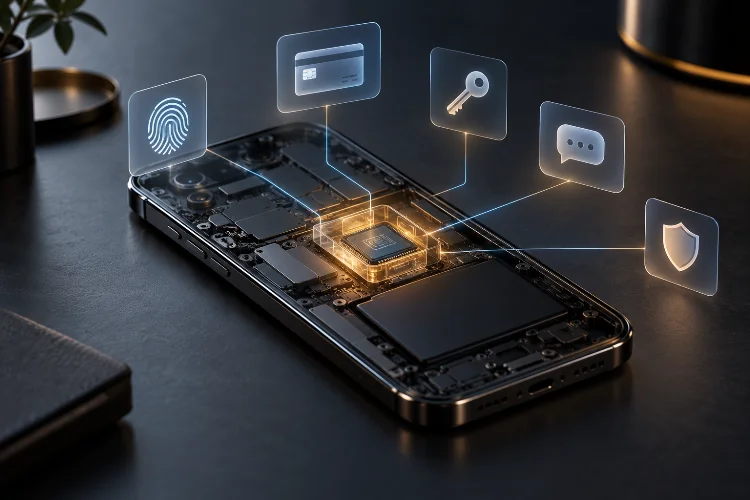
Modern smartphones hold far more sensitive information than most people realize. They store passwords, banking credentials, authentication tokens, private messages, biometric data, payment keys, health information, and sometimes even digital car keys.
Keeping all of that data inside the same environment as everyday apps would be risky.
That is why modern mobile devices increasingly rely on secure hardware areas such as secure enclaves, trusted execution environments, hardware-backed keystores, and dedicated security chips.
These systems create a protected space that is separated from the main operating system. Even if Android or iOS is compromised, sensitive cryptographic operations and key material can remain isolated.
Understanding how secure enclaves protect sensitive data on modern smartphones is important because mobile security now depends on much more than a lock screen.
The strongest devices use hardware-enforced isolation, secure boot, protected memory, biometric authentication, and dedicated cryptographic engines together.
The goal is simple: keep the most valuable secrets out of reach of ordinary apps and even the main processor whenever possible.
What a Secure Enclave Actually Is
A secure enclave is a protected hardware subsystem designed to handle sensitive operations separately from the main application processor.
Apple’s Secure Enclave is one of the best-known implementations. Apple describes it as a dedicated secure subsystem integrated into its system-on-chip and isolated from the main processor.
It is specifically designed to protect sensitive user data even if the application processor kernel is compromised.
That separation is the key idea.
The secure subsystem may have its own boot process, protected memory, cryptographic hardware, and rules controlling which operations are allowed.
Android devices use related concepts through Trusted Execution Environments, or TEEs, and in some cases dedicated hardware security modules such as StrongBox or Google’s Titan M2.
Arm TrustZone provides the architectural foundation for many of these designs by dividing hardware resources into secure and normal worlds.
This allows critical security functions to run in an environment that ordinary apps cannot directly access.
Hardware Isolation Protects Cryptographic Keys
Cryptographic keys are among the most valuable secrets on a smartphone.
They can be used to decrypt files, authenticate users, sign transactions, unlock accounts, or prove device identity.
If those keys are stored as ordinary files, malware with enough privileges might try to extract them.
Secure hardware changes that model.
Instead of exposing private keys to the main operating system, the secure subsystem can generate and store them internally. Apps can request a cryptographic operation, but they do not necessarily receive the key itself.
Android’s hardware-backed Keystore is built around this concept. Google documents that devices with a TEE can provide strong hardware-backed security services to Android and third-party apps, with sensitive key operations handled inside protected hardware.
This is a powerful security advantage.
If malware cannot export the private key, stealing it becomes significantly harder.
The app may be able to say, “Sign this message,” while the secure processor performs the signing operation internally and returns only the result.
Biometric Data Stays Outside Normal App Access
Face recognition and fingerprints are especially sensitive because users cannot simply reset them like a password.
That makes biometric templates a perfect use case for secure hardware.
Apple states that Face ID, Touch ID, and Optic ID rely on strict separation between the biometric sensor and the Secure Enclave. During enrollment, the Secure Enclave processes, encrypts, and stores the biometric template.
Apps never receive your actual fingerprint image or stored face template.
Instead, the system returns an authentication result.
For example, when an app asks to unlock a protected keychain item, the Secure Enclave can verify the biometric match and then return a pass-or-fail decision.
Apple explicitly notes that user-space software and the operating system do not gain access to the underlying biometric authentication data.
This architecture dramatically reduces the attack surface.
A compromised app may be able to request authentication, but it cannot simply copy your fingerprint template and send it somewhere else.
That distinction is fundamental to secure biometric design.
Secure Enclaves Strengthen Device Encryption
Modern smartphone encryption also depends heavily on protected key material.
A phone may encrypt nearly all user files, but encryption is only as strong as the keys protecting that data.
Apple’s hardware security architecture uses the Secure Enclave to support secure key generation and storage for data-at-rest protection.
Apple also describes dedicated AES hardware that can encrypt and decrypt files efficiently without exposing long-term key material to the main application processor or operating system.
This separation makes stolen-device attacks more difficult.
An attacker cannot simply remove the flash storage and expect to read the contents elsewhere.
Without the required keys and secure hardware context, the encrypted data remains unusable.
The same broader principle appears on Android devices through hardware-backed key storage and device encryption.
Security is therefore not only about encrypting files.
It is about protecting the keys so they cannot be easily extracted.
Payments Depend on Secure Hardware
Mobile payments require extremely strong authentication.
When you tap your phone at a terminal or approve an in-app purchase, the device may need to prove that an authorized user approved the transaction.
Secure hardware helps protect this process.
Apple allows biometric authentication to release cryptographic keys inside the Secure Enclave for operations such as approving purchases.
Apple notes that when a purchase is authorized with Face ID or Touch ID, the Secure Enclave can release an ECC key used to sign the request.
The important part is that the signing key remains protected.
The payment flow can use cryptographic proof without exposing the private key to ordinary software.
Android uses similar hardware-backed security principles for payment credentials and authentication systems.
This approach makes attacks harder because stealing an app’s files is not enough.
The attacker would also need to defeat the protected hardware and authorization policies around the key.
Trusted Execution Environments Add Another Security Layer
Not every smartphone uses a separate security chip for every protected function.
Many rely on a Trusted Execution Environment.
A TEE is a protected execution area inside the main system-on-chip.
Arm TrustZone is widely used to create this separation. TrustZone divides processor resources into Secure and Normal worlds, with hardware-enforced boundaries between them.
The normal world runs the main operating system and apps.
The secure world handles operations that need stronger protection.
That can include key management, secure boot verification, biometric processing, digital rights management, or other trusted services.
The benefit is that security does not depend entirely on the integrity of Android or another rich operating system.
Even if an attacker gains elevated privileges in the normal world, the secure world remains separated by hardware controls.
That said, TEEs are not invincible. Vulnerabilities can still exist in trusted firmware or implementation details.
Hardware isolation raises the difficulty of attack; it does not make compromise mathematically impossible.
StrongBox and Dedicated Security Chips Go Further
Some Android devices go beyond a standard TEE.
StrongBox-backed Keystore implementations use a separate secure hardware element with its own CPU, secure storage, random-number generator, and cryptographic capabilities.
This creates even stronger isolation because key operations do not need to share the same execution environment as the main application processor.
Google’s Pixel devices provide a good real-world example.
Current Pixel hardware combines a Tensor security core, the Titan M2 security coprocessor, and Trusty, Google’s Trusted Execution Environment. Google lists this multi-layer hardware security architecture as part of Pixel’s protection model.
The result is layered security.
If one layer fails, another may still protect critical assets.
This is a common security principle known as defense in depth.
Instead of trusting one giant barrier, the system uses several smaller barriers that an attacker must defeat in sequence.
Secure Boot Protects the Foundation
A secure enclave is far less useful if an attacker can load malicious firmware before the device starts.
That is why secure boot matters.
Secure boot creates a chain of trust from the earliest stage of startup.
Each component verifies the next component before allowing it to run.
Apple describes secure boot as part of its hardware security architecture, ensuring that trusted system software is loaded during startup.
Arm’s TrustZone documentation similarly emphasizes chain-of-trust concepts in secure systems.
This prevents attackers from simply replacing a trusted component with modified code and pretending nothing changed.
A secure enclave needs a trustworthy software stack around it.
Secure boot helps ensure that the protected environment begins from a known, verified state.
Apps Usually Access Security Through Controlled APIs
Developers normally do not communicate directly with secure hardware.
Instead, they use platform APIs.
On Android, developers can use Android Keystore to generate cryptographic keys with restrictions such as requiring user authentication or keeping the key hardware-backed.
On Apple platforms, apps use frameworks such as Keychain Services, LocalAuthentication, and Security.
This abstraction is important.
Developers can request strong security without needing to understand every detail of the secure processor.
An app might specify that a private key can only be used after biometric authentication.
The system then enforces that rule at a lower level.
This makes secure hardware useful beyond built-in operating-system features.
Third-party banking, messaging, enterprise, and identity apps can all benefit from the same hardware-backed protections.
Secure Hardware Limits the Damage of OS Compromise
One of the most important advantages of secure enclaves is containment.
Imagine malware manages to compromise a privileged part of the main operating system.
That is already a serious incident.
But if cryptographic keys, biometric templates, and sensitive operations are isolated elsewhere, the attacker still faces another boundary.
Apple explicitly designs the Secure Enclave to continue protecting sensitive data even if the main processor kernel is compromised.
Android’s hardware-backed Keystore follows the same broader philosophy.
The OS can ask the secure hardware to perform an operation, but the protected key material does not have to leave the secure environment.
This does not stop every type of attack.
Malware might still spy on user input, steal data after it has been decrypted, or abuse legitimate app permissions.
But isolation limits how much one compromise can expose.
That damage containment is one of the biggest reasons modern mobile security increasingly depends on specialized hardware.
Secure Enclaves Are Not a Complete Security Solution
It is important not to treat secure hardware as magic.
A secure enclave can protect keys and biometric templates, but it cannot fix every insecure app.
If a banking app stores account data carelessly after decrypting it, secure key storage will not prevent every leak.
If users install malicious profiles, approve phishing requests, or reuse weak passwords, hardware isolation only solves part of the problem.
Attackers may also target trusted firmware, side channels, implementation bugs, or the APIs connecting normal and secure environments.
The best smartphone security therefore combines several layers:
secure boot, secure enclaves, OS sandboxing, app permissions, encryption, patching, biometric authentication, and good application design.
The secure enclave is a very strong part of that stack, but it is not the entire stack.
Secure enclaves protect sensitive smartphone data by creating a hardware-isolated environment for the secrets that matter most.
Cryptographic keys can remain inside protected hardware. Biometric templates can be matched without exposing raw fingerprint or face data.
Payment authorization, device encryption, secure boot, and hardware-backed authentication all become harder to attack when the main operating system is not trusted with every secret.
Apple’s Secure Enclave, Android’s TEE and hardware-backed Keystore, StrongBox, and dedicated chips such as Titan M2 all follow this broader principle.
When evaluating smartphone security, do not look only at passwords and software features.
Check whether the device uses hardware-backed key storage, secure boot, and dedicated trusted hardware. Strong mobile security depends on keeping the most valuable secrets where ordinary software simply cannot reach them.
